
Introduction to Cheats in Enshrouded
Like many survival games, Enshrouded involves significant grinding for resources and progression. While the game does not include native console commands or built-in cheats, players can use third-party trainers to modify gameplay. This guide covers all available cheating methods, safety considerations, and alternatives.

Important Disclaimer: Using third-party software always carries risks. Use at your own discretion and understand that:
- Third-party tools are not officially supported
- Files could potentially be malicious
- Game updates may introduce anti-cheat features
- Your account/save could be at risk
- Multiplayer servers may ban cheaters
Native Cheat Support
Console Commands
Official Status:
- ❌ No native console commands in Enshrouded
- ❌ No built-in cheat codes
- ❌ No developer console
- ❌ No official mod support (yet)
This is Normal:
- Common in survival games
- Maintains game balance
- Prevents multiplayer abuse
- Preserves challenge
What This Means:
- Cannot use console for cheats
- Must rely on third-party tools
- Or play legitimately
- No official workarounds
Third-Party Trainers
What Are Game Trainers?
Trainers Explained:
- External programs
- Modify game memory
- Activate with hotkeys
- Provide cheat functions
- Not part of the game
How They Work:
- Launch the game
- Run trainer program
- Trainer detects game
- Press hotkeys to activate cheats
- Effects apply in-game
Available Trainer Sources
Popular Trainer Providers:
1. WeMod ⭐ (Recommended)
- Website: wemod.com
- User-friendly interface
- Large community
- Free and premium versions
- Regular updates
- Most popular option
2. Cheat Happens
- Website: cheathappens.com
- Established provider
- Subscription-based
- Professional trainers
- Good support
3. Fearless Cheat Engine
- Forum: Fearless Revolution
- Community-driven
- Advanced users
- Manual setup
- Free but complex
Recommendation: WeMod is easiest for beginners and most reliable.
Available Cheats
Complete Cheat List
All Trainers Provide Similar Options:
Health and Survival
- ✅ Unlimited Health - god mode
- ✅ Unlimited Stamina - infinite running/dodging
- ✅ No Hunger/Thirst - no need to eat/drink
- ✅ Max Comfort Level - always well-rested
Shroud and Exploration
- ✅ Unlimited Enshrouded Timer - stay in shroud forever
- ✅ No Fall Damage - jump from any height
- ✅ Infinite Breath - underwater breathing
Combat and Equipment
- ✅ Unlimited Durability - weapons never break
- ✅ One Hit Kill/Destroy - kill anything instantly
- ✅ Infinite Ammo - never run out of arrows/spells
Progression and Skills
- ✅ No Skill Point Decrease - free respecs
- ✅ Max Character Level - instant max level
- ✅ XP Multiplier - gain XP faster (2x, 5x, 10x)
Inventory and Resources
- ✅ Edit Selected Inventory Item - change quantity
- ✅ Infinite Inventory Space - never full
- ✅ Duplicate Items - clone items
Building and Crafting
- ✅ Free Crafting - no material cost
- ✅ Instant Crafting - no wait time
- ✅ Unlock All Recipes - instant access
Time and Environment
- ✅ Freeze Time - stop day/night cycle
- ✅ Speed Up Time - fast forward
- ✅ Weather Control - change weather
How to Use Trainers Safely
Step-by-Step Setup (WeMod Example)
Installation Process:
Step 1: Download WeMod
- Visit wemod.com
- Create free account (or sign in)
- Download WeMod application
- Install on your PC
Step 2: Find Enshrouded
- Launch WeMod
- Search for “Enshrouded”
- Click on the game
- Click “Play” or “Install”
Step 3: Launch Game with Trainer
- Important: Launch game through WeMod
- Or launch game first, then WeMod
- WeMod will detect running game
- Green “Playing” indicator shows connection
Step 4: Activate Cheats
- Click desired cheat in WeMod
- Or press assigned hotkey in-game
- Cheat activates
- Notification appears on screen
Step 5: Toggle Cheats
- Click again to disable
- Hotkeys toggle on/off
- Can activate multiple cheats
- Customize hotkeys in settings
Safety Considerations
Reduce Risk:
-
Backup Save Files
- Before using trainers
- Regularly backup
- Can restore if issues
-
Use Reputable Sources
- WeMod, Cheat Happens (established)
- Avoid random websites
- Check reviews/reputation
-
Antivirus May Flag Trainers
- Trainers modify memory = suspicious
- Often false positives
- Add exceptions if trusted
- Or accept risk
-
Don’t Use in Multiplayer
- Unfair to other players
- May get banned
- Single-player only recommended
- Respect community
-
Game Updates May Break Trainers
- After Enshrouded updates
- Trainers need updating
- Wait for trainer update
- Check provider’s website
Alternatives to Cheats
Legitimate Easier Gameplay
Don’t Want to Cheat? These Help:
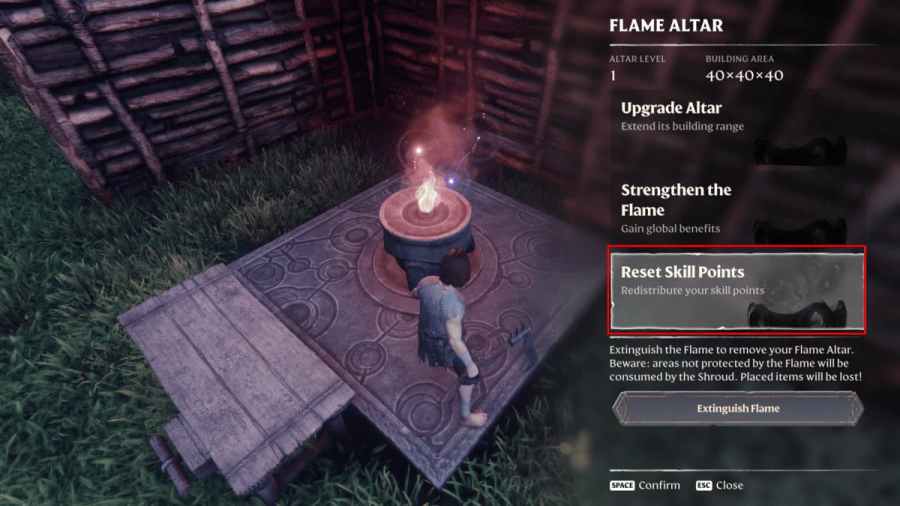
1. Use Respec System
- Reset skills anytime
- Only costs 1 wood
- Fix mistakes easily
- Experiment freely
2. Optimize Your Build
- Best skills guide
- Class tier list
- Better builds = easier game
- No cheating needed
3. Farm Efficiently
- Legendary items guide
- Better gear legally
- Respawn mechanics
- Feels more rewarding
4. Multiplayer Co-op
- Play with friends
- Share resources
- Help each other
- More fun than solo cheating
5. Adjust Difficulty
- If game has difficulty settings
- Lower for easier experience
- No shame in easier modes
- Enjoy at your pace
Popular Use Cases
Why Players Use Trainers
Common Scenarios:
1. Testing and Experimentation
- Try different builds quickly
- Test weapons/spells
- Explore all content
- Learn game mechanics
2. Second Playthrough
- Already beat game legit
- Want to mess around
- Build crazy bases
- Casual fun
3. Time Constraints
- Limited gaming time
- Skip grinding
- Experience story
- See all content
4. Stuck on Progression
- Can’t beat boss
- Need better gear
- Temporary boost
- Continue story
5. Creative Building
- Unlimited resources
- Build massive bases
- No resource farming
- Focus on creativity
Recommendation: Try legitimate play first! Part of the fun is progression.
Trainer Comparison
WeMod vs Cheat Happens vs Fearless
WeMod:
- ✅ Free option available
- ✅ Easy to use
- ✅ Regular updates
- ✅ Large game library
- ⚠️ Some cheats premium-only
- ⚠️ Requires account
Cheat Happens:
- ✅ Professional quality
- ✅ Reliable updates
- ✅ Good support
- ⚠️ Subscription required
- ⚠️ More expensive
Fearless Revolution:
- ✅ Completely free
- ✅ Community-driven
- ✅ Advanced options
- ⚠️ Requires Cheat Engine
- ⚠️ Steeper learning curve
- ⚠️ Manual setup
Best Choice: WeMod for most users (ease of use + reliability)
Hotkey Configuration
Customizing Controls
Why Customize Hotkeys:
- Avoid conflicts with game
- Easy access during play
- Personal preference
- Better ergonomics
How to Change (WeMod Example):
- Click cheat you want to change
- Click “Change Hotkey” button
- Press desired key combination
- Confirm change
- Test in-game
Recommended Hotkeys:
- Numpad keys (1-9)
- F-keys (F1-F12)
- Avoid movement keys (WASD)
- Avoid common game keys
Troubleshooting Trainers
Common Issues and Fixes
Trainer Won’t Detect Game
Solutions:
- Launch game through trainer
- Or launch trainer after game starts
- Run both as administrator
- Check antivirus isn’t blocking
- Ensure game version matches trainer
Cheats Don’t Work
Solutions:
- Game updated? Wait for trainer update
- Press correct hotkey
- Check cheat is activated (green indicator)
- Try restart game and trainer
- Reinstall trainer
Game Crashes with Trainer
Solutions:
- Don’t activate all cheats at once
- Activate one at a time
- Some cheats may conflict
- Update trainer version
- Report bug to trainer developer
Antivirus Blocks Trainer
Solutions:
- Add trainer to exceptions (if trusted)
- Temporarily disable antivirus
- Or don’t use trainer (safest)
- Understand risk involved
Ethics and Considerations
Single-Player vs Multiplayer
Single-Player:
- ✅ Your game, your choice
- ✅ No impact on others
- ✅ Personal experience
- 🤔 Consider: ruins challenge?
Multiplayer:
- ❌ Unfair to others
- ❌ Ruins competitive balance
- ❌ May get banned
- ❌ Disrespectful to community
Strong Recommendation: Only use in single-player!
Impact on Enjoyment
Consider:
- Part of fun is overcoming challenges
- Earning rewards feels good
- Progression gives satisfaction
- Cheating may bore you faster
When Cheats Make Sense:
- Second+ playthrough
- Already beat legitimately
- Time constraints
- Purely creative mode
When to Avoid:
- First playthrough
- Competitive play
- Multiplayer
- If ruins your fun
Legal and Security Concerns
Is Using Trainers Legal?
Generally Legal:
- Modifying single-player game
- No piracy involved
- Own purchased copy
- Terms of service vary
But Understand:
- Against most TOS (Terms of Service)
- Could void support
- Multiplayer bans possible
- At your own risk
Security Risks
Potential Dangers:
- Malicious software possible
- Keyloggers in fake trainers
- Account theft risk
- Save corruption possible
Minimize Risk:
- Only use established providers
- WeMod, Cheat Happens = safer
- Avoid random forums/websites
- Scan files with antivirus
- Backup saves regularly
Remember: You are responsible for consequences!
Frequently Asked Questions
Are there console commands in Enshrouded?
No, Enshrouded does not have native console commands or built-in cheat codes. You must use third-party trainers for cheat functionality.
Is it safe to use trainers?
Trainers from reputable sources (WeMod, Cheat Happens) are generally safe but always carry some risk. Use at your own discretion, backup saves, and never use in multiplayer.
Can I get banned for using trainers?
In single-player, unlikely. In multiplayer, yes - servers can detect and ban cheaters. Only use trainers in single-player mode.
Do trainers work after game updates?
Often trainers break after game updates and need to be updated by their developers. Check the trainer website for updates before using after an Enshrouded patch.
Are trainers free?
WeMod has free options with some premium features. Fearless Revolution is completely free. Cheat Happens requires a subscription.
Will trainers corrupt my save file?
Possible but rare with reputable trainers. Always backup your save files before using any trainer to be safe.
Conclusion
While Enshrouded doesn’t include native cheats or console commands, third-party trainers provide extensive cheat functionality for players who want an easier or modified experience. Always use trainers responsibly, only in single-player, and from reputable sources to minimize risks.
Key Takeaways:
- ❌ No native console commands - must use trainers
- ✅ WeMod recommended - easiest and safest
- ⚠️ Use at your own risk - not officially supported
- 🚫 Single-player only - never in multiplayer
- 💾 Backup saves - before using trainers
- 🤔 Consider alternatives - respec, optimization, co-op
Final Thought: Try the game legitimately first - overcoming challenges is part of the Enshrouded experience!
Related Guides
- Beginner’s Guide to Enshrouded
- How to Respec Your Character
- How to Farm Legendary Items
- Best Skills to Unlock First
Related Guides

Beginner's Guide to Enshrouded - Getting Started
Complete beginner's guide for Enshrouded covering essential survival tips, first steps, crafting basics, and everything you need to know to start your adventure.
How to Respec in Enshrouded - Complete Skill Point Reset Guide
Complete guide to respeccing and resetting skill points in Enshrouded, including the rune system, costs, strategy tips, and when to respec your character build.